Mark.

Guest Post, Inspiration, Leica 50mm Noctilux f/0.95, Portrait, Q&A, Street, Teaching point

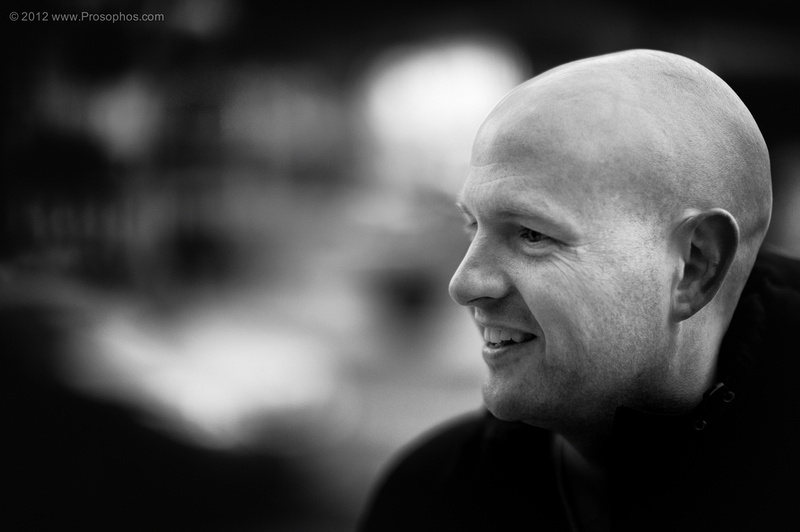
Yesterday I had the pleasure of meeting Mark, a fellow Canadian and reader of this site.

[Please see some of Mark’s previous contributions, here and here].

And he’s gentleman, through and through.

After sharing a cup of coffee and our life experiences, we walked over to Dundas Square to photograph and found it almost completely empty!  Incredible.

I did end up with one image though — the only image that counts:  a portrait of Mark.

—Peter.

Mark

↑Leica M9 and Leica Noctilux @ f/0.95.

Update 2: Getty & Christmas at the Toronto Beach.

Inspiration, Print, Teaching point

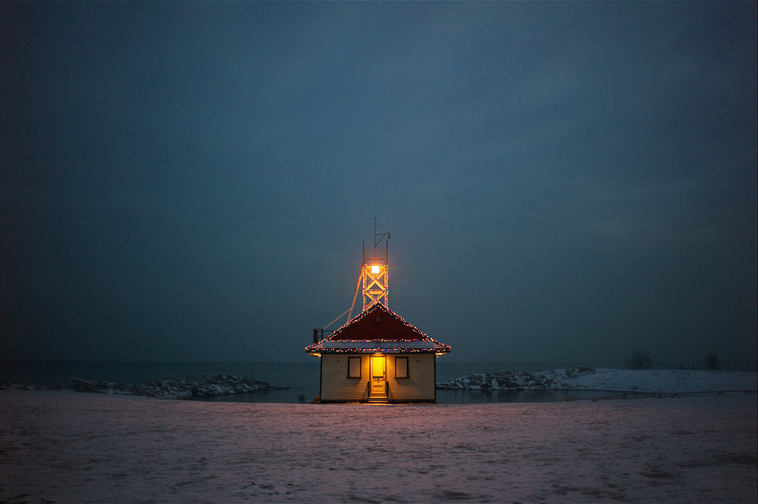
In October, I  provided an update to the above image, Christmas at the Toronto Beach, which I’d licensed over to Getty Images.  The original post can be found here.

Tonight, I discovered via the Getty Contributor website that the rights for this image have been purchased again, this time by a “fashion/textiles” company in France, for a period of three months.

Interestingly, the royalty fee paid was almost three times the amount of what the first company paid.  Hmmm… I’m beginning to re-think this whole Getty thing.

Funny enough, this image was taken with the Leica 28mm Summicron ASPH, a lens I used for only a very brief period of time.

Funnier still is the date that this latest royalty amount will be paid out:  Christmas Day.

—Peter | Prosophos.

Frames.

Inspiration, Leica 75mm Summilux (Canada 🇨🇦) f/1.4, Life's Little Moments, Teaching point

We exist in single frames of time, but they pass quickly and seamlessly and so we are unaware of most of them; occasionally, the discrete click of a camera shutter marks the capture of one.

And so we are bestowed with the power to linger over a moment, a memory.

Sometimes we laugh, sometimes we cry, and sometimes we struggle to remember… but no matter how we are affected, we can’t help but think that our frames are finite, our frames are numbered.

—Peter | Prosophos.

_

↑Leica M9 and Leica 75mm Summilux @ f/1.4.

Leica M and CMOS. That sinking feeling continues…

Inspiration, Teaching point

_______________

Twice now I’ve written about my preference for CCD sensor rendering at base ISO, and about my concern that Leica’s switch to a CMOS sensor for the upcoming Leica M camera may represent a step backwards for image quality:

The M9 and CCD sensor.

CMOS: that sinking feeling again.

The M9 has a CCD sensor, and the M8 before it had one too.  In both cases, the image quality — again, at base ISO — was superior to anything being produced by CMOS-based cameras.  This was true in 2006 (M8) and 2009 (M9), and it is true even today, despite the release of a new generation of CMOS cameras from Nikon, Canon, and Sony.

So here we are, very close to the release of the new Leica M, and Leica continues to be curiously quiet… no full-size sample images have been made available.

They’ve either figured out a way to do what no other manufacturer has done before (and are quietly ecstatic), or they are worried.

I’m betting they’re worried.

The new Leica M will bring many advancements and improvements over the outgoing M9, just don’t expect image quality to be one of them.

—Peter.

A good image should grab you.

Inspiration, Teaching point

___________________

A good image should grab you.

If you have to read a book, or attend a class, or visit an art gallery in order to appreciate an image, then it has failed as an image.

Simple as that.

You may need to do all of the above in order to understand some images (symbolism, context, references, etc.) but that’s a different issue because, though you may not understand an image, you may still appreciate it as a form of expression.

Photography is a visual art after all.

The first — and most important — order of appreciation for any image (photo, painting, etc.) is therefore at the visual level.  If it doesn’t pass that test, it’s literally not worth looking at.

—Peter.

Follow-up: Getty Images.

Inspiration, Q&A, Teaching point

[Now that my iMac is down, I’m taking the opportunity to catch up on some of my writing.]

Back in April, I mentioned that Getty Images, the well-known distributor of image content, was interested in about 40 of my images.

At the time, I was wondering whether I should go ahead and license my images to them.  Since most of them involve people, the paperwork involved for submission was going to be a bit of a hassle.

After pondering it, and also taking into consideration some of your comments, I decided to submit just three.

After that, I kind of forgot about the whole thing.

Well, while I was away in August, I received an e-mail from Getty informing me that the rights to one of those images, Christmas at the Toronto Beach (the image above) had been purchased, and that I would be receiving a royalty payment for it some time in October.

Sure enough, the payment arrived a couple of days ago.

The amount:  US$154.50.

After accessing the Getty Contributor website yesterday, I learned that this amount represents 30% of the total Getty was paid, and that my image was licensed for world-wide usage, for a duration of two years.

The intended use?  Greeting cards (my guess is that you’ll see it on a Christmas card near you).

This was a bit of a learning experience for me, so I’m glad I did it.  Having said that, I don’t know if I’ll be submitting any more images to Getty.

I hope that this post was of interest to those of you considering licensing your own images.

—Peter.

My Apple computer is down (but not out).

Inspiration, Q&A, Teaching point

I’m currently having trouble with my almost 3 yr old iMac.

It’s faithfully helped me post-process all of the images you’ve seen on this site, both film and digital, but over the last few months it has slowed down to a crawl.

Often it just freezes, necessitating a re-start.

So, I had it checked out over the weekend and it turns out that the hard drive needs replacing.  It since has been sitting in my local Apple store, and is currently in “repair” status, so I haven’t been able to process any new images.  Instead, I’ve been posting my previously prepared images using another computer.

(The “spice” has to keep flowing, after all…)

As it turns out, I’m not the only one with the same problem…  a few days ago, I received a message from Apple, stating:

Dear iMac owner,

Apple has determined that certain 1TB Seagate hard drives used in 21.5-inch and 27-inch iMac systems may fail. These systems were sold between October 2009 and July 2011.

Our records show that you have an iMac with an affected 1TB Seagate hard drive. Apple will replace your hard drive with a new one, free of charge, under the iMac 1TB Seagate Hard Drive Replacement Program.

Please choose one of the following options to get a replacement hard drive.

• Apple Retail Store – Set up an appointment with a Genius.
• Apple Authorized Service Provider – Find one here.
• Apple Technical Support – Contact us for local service options.

Apple recommends replacing your affected hard drive as soon as possible. Before you go in for service, please back up your data. Learn more about backup options.

Additional Information

You will need to have the original Mac OS installation discs that were shipped with your iMac in order to reinstall your operating system, other applications, and any backed up data after your hard drive is replaced.

This worldwide Apple program does not extend the standard warranty coverage of the iMac.

Apple will replace affected 1TB Seagate hard drives, free of charge, for three years from your iMac’s original date of purchase or until April 12, 2013, whichever provides longer coverage for you. Apple will continue to evaluate service data and provide extensions to this program as needed.

We apologize for any inconvenience.

Sincerely,

Apple Inc.

So, if you’re having trouble with your iMac, check to see if yours is affected.


As an aside, along with the hard drive fix, my computer screen is also being replaced free of charge (thank you AppleCare), because it started developing some horizontal dark banding in the upper left corner.

I guess I could complain about my computer falling apart, but instead I’m pleased that Apple is standing behind its product, and its extended warranty.  Thank you Apple.

And, since I intend on holding on to my Leica M9, I don’t have a pressing need to upgrade this iMac.  Hopefully, when I get it back, it will give me a few more years of service.

—Peter.

Q&A: My images, my approach, and Leica.

Inspiration, Q&A, Teaching point

“Hello Peter.

I was reading Steve’s [SteveHuffPhoto.com] and [this] led me to your wonderful pictures. Then [this] led me [to] thinking how do you shoot?

Do you “wear” your camera? Do you have those “one-a-day” projects?

And I LOVE your 21+1 from ’12 and 11 from ’11.

Then it led me to think again. Are the pictures “out-of-the-camera”?

Do you use photo shop to achieve those colours? Or it that really Leica magic?

Keefe.”

_________________

Hi Keefe,

I often “wear” my camera, but I don’t really have a “one-a-day” project (having said that, I often post a photo every day on my site).

None of my photos are presented as they emerge out of the camera.  I shoot in DNG (RAW) format which produces rather nondescript files, so it’s up to me to work with the images and shape them as I see fit.

I use Aperture with Nik plug-ins for my post-processing.

And I try to learn as I go along… continuously.

As for Leica magic?  For me… yes.  It’s a combination of having a camera that suits my shooting style and that is accompanied by great optics.

Thanks for writing,

—Peter.

Q&A: 1-on-1 Teaching Sessions for post-processing?

Inspiration, Q&A, Teaching point

_______________________________

“Hi Peter,

I love your work.

Read your article about shooting your family with the best gear on Steve Huff. I am located in [USA] and wonder if you have any private sessions on editing digital photos rather than walking sessions. Just wondering what that might cost… Thanks a ton.

Pete.”

________________________

I’m often asked about my post-processing (see a previous Q&A here) and sometimes get a request — like the one from Pete above — to use my  1-on-1 teaching sessions as a tutorial for post-processing.

I therefore thought it might be useful to post my response to Pete:

_

Hi Pete,

Thank you for writing.

To answer your question, I’ve always thought of the 1-on-1 teaching as an opportunity to teach anything… and I often do.

The only problem with teaching my post-processing is that I don’t follow a “cookbook” approach.  It’s a creative thing, so it doesn’t lend itself well to a “Step1, Step 2…” approach.

Having said that, I do have some techniques that I’ve developed over the years.

I’d be open to teaching them, but I would need you to supply a laptop loaded with Apperture (or Lightroom) and some of the Nik plug-ins (not absolutely necessary).  My fee would have to be the same for 2 hours, as I charge for time and not content.  And then you’d have to figure in your own travel costs.

So, as you can see, it would be pricey for you.  I will leave it up to you as to whether you think it’s worth it.

Either way, thanks again for writing, and for your kind words.

Cheers,

Peter.

Answer to: Film or Digital?

Inspiration, Leica 35mm Summilux ASPH FLE f/1.4, Teaching point

Yesterday, I posted an image and posed the question: Film or Digital?

To those of you who submitted a guess, thank you.  I know it’s difficult to go out on a limb like that, especially when you have the option of safely viewing the proceedings from a distance.

For what it’s worth, the final tally of guesses was:

___________

Digital: 10

Film: 8

___________

An almost even split!  Moreover, some who chose digital stated that the image looks like film, and vice versa.  This confirms what I suspected: this was a difficult image to identify.

So, without further delay, the answer is:

Digital

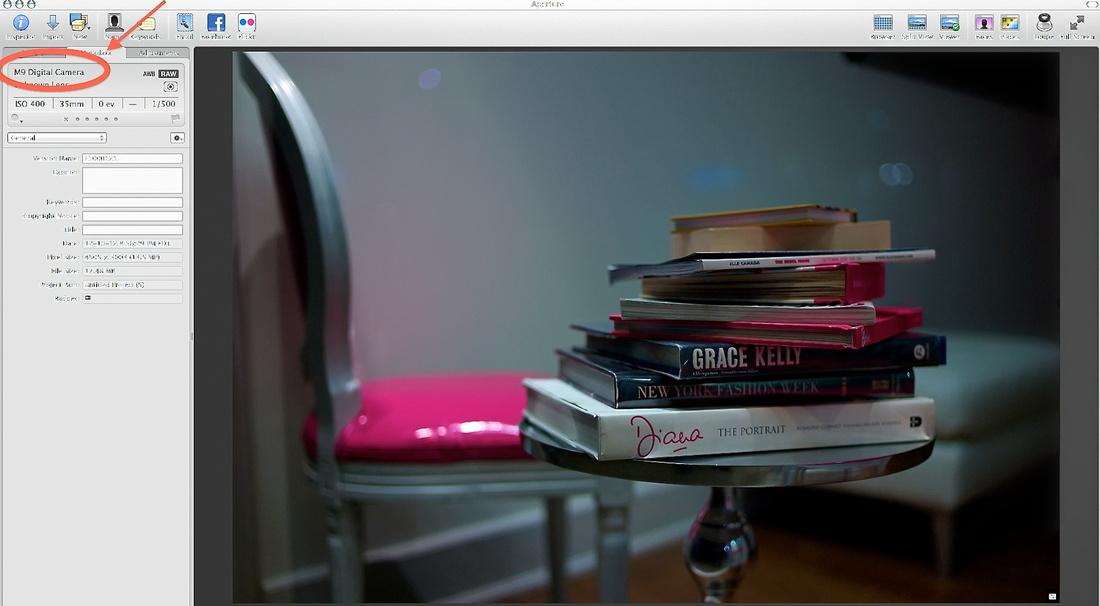
↑Leica M9, ISO 400, and Leica 35mm Summilux FLE @ f/1.4.

The above screen shot is of the original M9 file, opened in Aperture.

To stack the odds towards conveying a film look, I chose a scene in which the subject matter had a retro vibe about it.  Then I post-processed the image to B&W.  The “grain” seen in the finished image (to the right, in the shadows) is actually digital noise that has emerged from selective lightening, and that has been post-processed to look like film grain.  More or less.

Some of you were impressed by it.  Some of you commented that it did not “feel” like film grain, and so guessed digital.  I believe it’s in fact the quality of film grain, among a few other things, that usually identifies the medium… but I have occasionally been fooled.

Once again, I thought the simulation in this example was pretty good.

As an aside, a few of you remarked that you were viewing yesterday’s post on a phone screen, which means that the process of evaluating for any nuances in image quality would have been difficult, if not impossible.

I guess many of our photos are being viewed on smartphones or tablets these days, so it’s something I should keep in mind when posting such comparative-type evaluations.

—Peter.

Just for fun: film or digital?

Inspiration, Teaching point

Simple question really.

I’ve always asserted that most of the time the answer is readily apparent, but is that the case here?

Now, I know many of you will assume that — since I’m asking — it must be digital.  Others of you will identify a hint of reverse-psychology at play, and you’ll choose film.

So, for you brave ones out there, what’s it going to be? 🙂

—Peter.

↑Camera and lens information withheld.

[Update: Answer is here.]

The Noctilux f/0.95 (50% and 100% crops).

Inspiration, Leica 50mm Noctilux f/0.95, Portrait, Teaching point

Yesterday, I posted the image Father Figure, which was taken with the Leica Noctilux f/0.95.

I know many of you — in addition to being interested in viewing photographs taken with the Noctilux f/0.95 — are also interested in the technical aspects of this lens.

So, I’ve decided to display the central portion of the Father Figure image at 50% and 100% magnification.  Note that the photo was shot at f/0.95, at the minimum focusing distance of 1 meter, and therefore any conclusions you draw should be considered in the context of this aperture and distance.

First the 50% crop

I’ve chosen the 50% crop because it nicely displays the quick — but extremely smooth — transition between the in-focus and the out-of-focus elements (I’ve used the word “rounded” to describe this exquisite rendering):

(please click on the image to view the large version)

↑Leica M9 and Leica Noctilux @ f/0.95 (50% crop).

Now the 100% crop

I’ve chosen the 100% crop to illustrate the level of central sharpness available at f/0.95:

[Note: the point of focus was his right eye; minimum sharpening was added during post-processing.]

(please click on the image to view the large version)

↑Leica M9 and Leica Noctilux @ f/0.95 (100% crop, minimum sharpening).

I hope you’ve found the above useful.

—Peter.

The Noctilux @ f/0.95 and “rounded” rendering.

Inspiration, Leica 50mm Noctilux f/0.95, Portrait, Teaching point

This slightly cropped image is a good example of the pleasingly “rounded” rendering this lens is capable of @ f/0.95 (see my comment under yesterday’s post).

What I’m referring to is the gentle 3D effect, that — unlike the slightly more “cut out of the scene” 3D effect you get with the 50 Summilux ASPH — is exceptionally smooth, very organic.  Specifically, his face is gently simultaneously emerging from, and blending into, the background.

Despite this, the point of focus (the nearest edge of the sunglasses) is bitingly sharp.

Incidentally, it’s this level of sharpness at 1 meter (the near focus limit) and the exceptionally smooth bokeh that separate this Noctilux from the previous f/1 version, which renders in a slightly softer way, and which depicts backgrounds in a thick-brush-painterly manner.

—Peter.

↑Leica M9 and Leica Noctilux @ f/0.95.